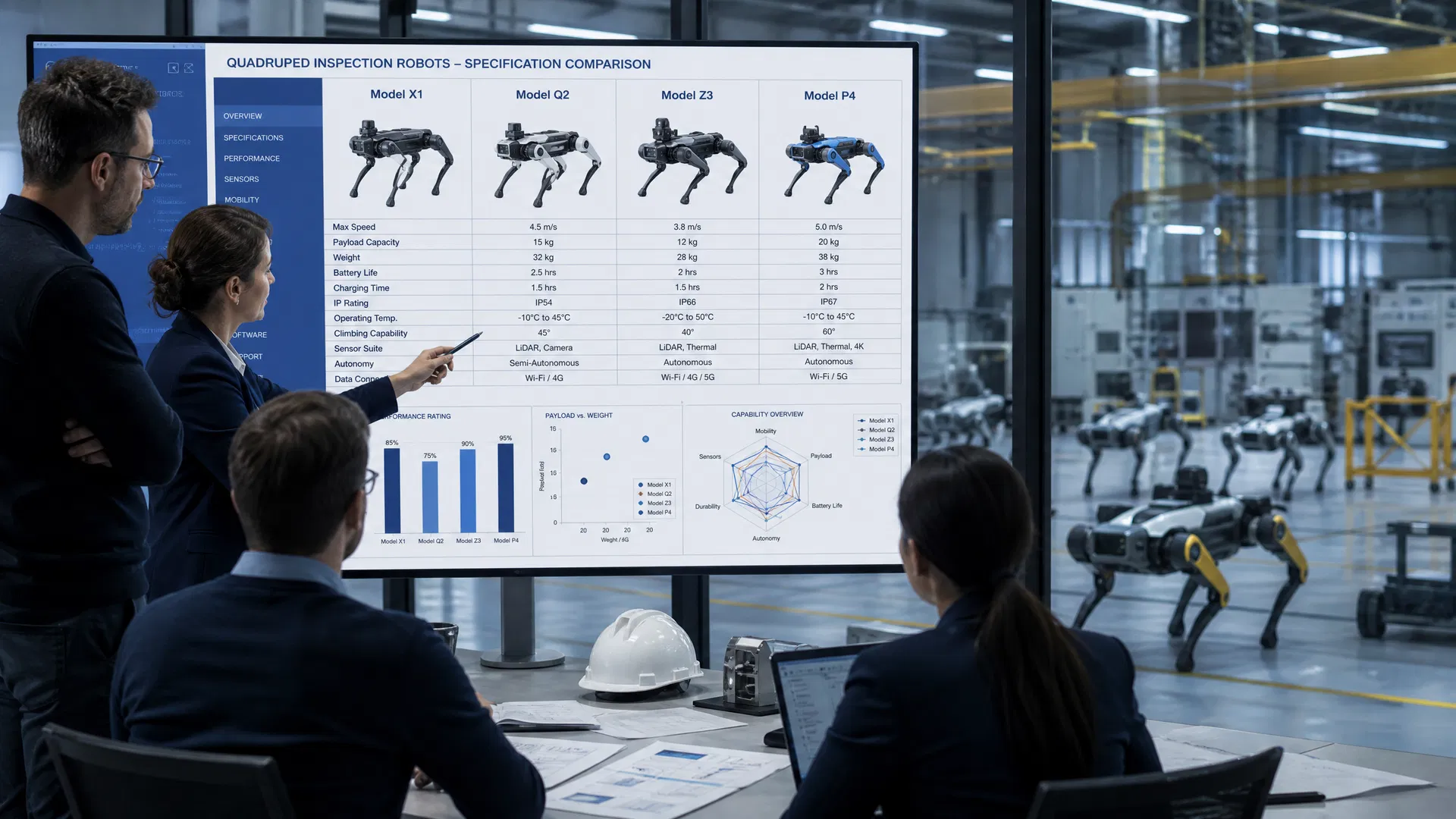
The industrial inspection robot market has grown fast enough in the past three years that most procurement teams are evaluating platforms without much institutional knowledge to draw on. There’s no established playbook for buying an inspection robot the way there is for buying a forklift or a CMMS system. Vendors are eager to demo, the technology is genuinely impressive, and it’s easy to make a decision based on the wrong criteria.
🔗 Compare Our Robot Models
- Full Product Comparison Table — Side-by-side specs for all RZTL and ZSL series robots
- RZTL-1W — Best for power & energy inspection (thermal + visible, 8 m/s, IP67)
- Tongchui M1 — Heavy-duty outdoor terrain, 25 kg payload
- ROI Calculator — Estimate your payback period
- Pricing Guide — Total cost of ownership and deployment models
I’ve seen facilities invest in platforms that looked great in a demo but couldn’t handle their actual floor conditions. I’ve seen procurement teams get locked into proprietary ecosystems that made sensor upgrades prohibitively expensive. And I’ve seen organizations deploy robots without thinking through the data integration question, ending up with inspection data that sat in a vendor’s cloud portal and never connected to a maintenance action.
This guide is built around seven questions that cut through the demo theater and get to what actually matters for industrial deployment. They’re not the only questions worth asking, but they’re the ones that most consistently separate platforms that will deliver long-term value from those that won’t.
Question 1: What Does Your Facility’s Floor Actually Look Like?
This sounds obvious, but it’s the question that most demos skip. Vendors show you their robot navigating a clean, flat, well-lit environment. Your facility probably has wet floors, oil contamination, cable runs across walkways, narrow passages between equipment, stairs, ramps, and outdoor areas with gravel or uneven concrete.
Before evaluating any platform, document your actual inspection environment in detail. What’s the worst-case floor surface? What’s the minimum passage width? Are there stairs or significant elevation changes? What are the temperature extremes — both ambient and radiant from hot equipment? Is the environment wet, dusty, or chemically contaminated?
This documentation becomes your platform evaluation filter. A wheeled robot that performs beautifully on a smooth factory floor may be completely unsuitable for a facility with wet grating, cable trays on the floor, or outdoor terrain. Quadruped platforms generally handle varied terrain better than wheeled alternatives, but their performance on specific surfaces varies significantly between manufacturers. Ask for a site visit with the actual robot before committing.
Question 2: What Certifications Does Your Environment Require?
If any part of your inspection route passes through or near classified hazardous areas — Zone 1/2 (gas) or Zone 21/22 (dust) under ATEX, or equivalent IECEx zones — you need a robot certified for operation in those areas. This is not a nice-to-have; it’s a legal requirement in most jurisdictions, and operating uncertified equipment in a classified area creates significant liability exposure.
ATEX and IECEx certification is expensive and technically demanding to obtain, which is why many robot manufacturers don’t have it. When vendors say their robot is “suitable for hazardous areas” without citing a specific certification, that’s a red flag. Ask for the certificate number, the certifying body, and the specific equipment category and zone classification.
Beyond hazardous area certification, consider:
- IP rating: IP65 is the minimum for dusty or wet environments; IP67 for regular water exposure; IP68 for immersion. Verify that the rating applies to the complete robot system including all sensors and connectors, not just the chassis.
- Operating temperature range: Industrial environments can be extreme. Outdoor facilities in the Middle East may see ambient temperatures above 50°C; cold storage facilities operate well below freezing. Verify the robot’s rated operating range against your actual conditions.
- EMC compliance: Facilities with high-voltage equipment generate significant electromagnetic interference. Verify that the robot meets relevant EMC standards for your environment.
Question 3: What Sensors Does It Carry, and Can You Add More?
The robot platform is the carrier; the sensors are what actually collect the inspection data. This distinction matters because your inspection requirements will evolve over time, and a platform that locks you into a fixed sensor configuration will limit your ability to expand the program’s scope.
For most industrial inspection applications, a useful baseline sensor suite includes:
| Sensor Type | Primary Application | Key Specification |
|---|---|---|
| High-resolution visible camera | Visual inspection, gauge reading, label recognition | ≥4K resolution; optical zoom for distant targets |
| Thermal (LWIR) camera | Electrical hot spots, bearing temperature, insulation faults | NETD ≤50 mK; ≥320×240 resolution |
| LiDAR | Navigation, 3D mapping, obstacle detection | Multi-layer; range ≥50m for large facilities |
| Gas detection | Leak detection, atmospheric monitoring | Sensor type matched to target gases (LEL, H₂S, CO, O₂) |
| Acoustic/ultrasonic | Compressed air/gas leak detection, bearing fault detection | Frequency range covering ultrasonic leak signatures |
When evaluating platforms, ask specifically about the payload interface: Is it a proprietary connector that only supports the manufacturer’s sensors, or an open interface that allows third-party sensors? What’s the payload weight and power budget? How does sensor data from different modalities get synchronized and stored? Platforms with open, well-documented payload interfaces give you significantly more flexibility as your inspection program matures.
Question 4: How Does the Robot Navigate, and What Happens When It Gets Lost?
Navigation reliability is the single most important operational characteristic of an inspection robot, and it’s the one most often glossed over in demos. A robot that navigates flawlessly in an empty facility during a demo may struggle significantly in a working facility with moving equipment, temporary obstructions, people, and changing conditions.
Modern inspection robots use SLAM (Simultaneous Localization and Mapping) for navigation — building and maintaining a map of the environment while localizing themselves within it. The quality of SLAM implementation varies enormously between platforms. Key questions:
How does the robot handle dynamic obstacles? People, forklifts, and temporary equipment are part of every working facility. The robot needs to detect and navigate around them without getting stuck or requiring human intervention.
What happens when the robot loses localization? In environments with repetitive features — long corridors, identical equipment bays — SLAM can fail. How does the robot recover? Does it stop and wait for human assistance, or does it have a recovery procedure? How does the operator know when this happens?
Does it work in GPS-denied environments? For indoor and underground facilities, GPS is unavailable. The robot must navigate entirely on SLAM. Verify that the platform has been validated in environments similar to yours, not just in open outdoor areas where GPS is available.
How does it handle map changes? Facilities change — equipment gets moved, new installations appear, temporary structures go up. How does the robot update its map to reflect these changes, and how much operator effort does this require?
Question 5: How Does Inspection Data Connect to Your Maintenance Workflow?
This is the question that most organizations don’t ask until after deployment, when they discover that their inspection data lives in a vendor portal that doesn’t connect to anything else. It’s also the question that most directly determines whether the robot delivers operational value or just generates impressive-looking reports.
The inspection data lifecycle should look like this: robot captures data → anomaly detected → work order created in CMMS → maintenance team dispatched → fault corrected → work order closed → inspection record updated. Every break in that chain reduces the value of the inspection data.
Ask vendors specifically:
- Does the platform have a documented API for integration with third-party CMMS systems?
- Which CMMS platforms does it have existing integrations with?
- Can it automatically create work orders when anomalies are detected?
- How is inspection data exported for long-term archiving and audit purposes?
- What happens to your data if you stop using the vendor’s platform?
Data portability and integration flexibility are particularly important for large organizations with established CMMS investments. A robot that requires you to use the vendor’s proprietary maintenance management platform is a significant constraint.
Question 6: What Does the Total Cost of Ownership Actually Look Like?
The purchase price of an inspection robot is typically the smallest component of its total cost of ownership. Understanding the full TCO picture before committing is essential for making a sound business case.
The major TCO components to evaluate:
Software licensing: Most inspection robot platforms charge ongoing software subscription fees for fleet management, data analytics, and cloud storage. These fees can be substantial — sometimes exceeding the hardware cost over a 5-year period. Get a clear breakdown of what’s included in the base price and what requires additional licensing.
Maintenance and support: What’s included in the warranty, and what does post-warranty support cost? What’s the typical maintenance schedule, and what does it require? Can your in-house maintenance team perform routine maintenance, or does it require factory service?
Battery replacement: Robot batteries degrade over time. What’s the expected battery life, and what does replacement cost? For facilities running robots on multiple shifts, battery management and charging infrastructure are significant operational considerations.
Sensor calibration and replacement: Thermal cameras, gas sensors, and acoustic sensors require periodic calibration and eventual replacement. What are the calibration intervals and costs? Are calibration services available locally, or does equipment need to be shipped to the manufacturer?
Training and change management: The robot is only as effective as the team operating it and acting on its data. Budget for initial training, ongoing competency development, and the organizational change management required to integrate robot inspection data into maintenance workflows.
Question 7: What Does the Vendor’s Support Infrastructure Look Like in Your Region?
An inspection robot that goes down in a critical facility needs to be back in service quickly. The vendor’s support infrastructure — technical support availability, spare parts logistics, and local service capability — is a critical operational consideration that’s easy to overlook when evaluating technology.
Key questions for international deployments in particular:
- Where are spare parts stocked? What’s the typical lead time for critical components?
- Is there local technical support in your region, or does support require remote assistance from the manufacturer’s home country?
- What’s the guaranteed response time for critical support issues?
- Does the vendor have reference customers in your region who can speak to their support experience?
For facilities in the Middle East, Southeast Asia, or other markets distant from major robot manufacturers, the support question is particularly important. A technically superior platform with poor regional support may deliver worse operational outcomes than a slightly less capable platform with strong local presence.
Putting It Together: A Practical Evaluation Framework
With these seven questions as your framework, a structured evaluation process might look like this:
Start with a requirements document that captures your facility’s physical environment, hazardous area classifications, inspection objectives, existing CMMS infrastructure, and support requirements. Use this document to filter the vendor field before investing time in demos — platforms that can’t meet your basic requirements shouldn’t make it to the demo stage.
For vendors that pass the initial filter, request a site visit with the actual robot (not a demo unit) in a representative section of your facility. Pay attention to how the robot handles real conditions: floor surfaces, obstacles, narrow passages, and the presence of people and moving equipment.
Ask for reference contacts at facilities similar to yours — same industry, similar environment, similar inspection objectives. Talk to those references about their actual operational experience, not just their initial impressions.
Finally, model the full TCO over a 5-year horizon before making a final decision. The platform with the lowest purchase price is rarely the lowest TCO option.
Conclusion
Buying an industrial inspection robot is a significant capital decision with long-term operational implications. The technology is mature enough that there are genuinely good platforms available — but also enough variation in quality, capability, and vendor support that careful evaluation is essential.
The seven questions in this guide won’t tell you which platform to buy, but they’ll help you avoid the most common procurement mistakes and give you a framework for making a decision you’ll be comfortable with three years after deployment, when the demo excitement has faded and you’re relying on the robot to do real work.
Tagged: